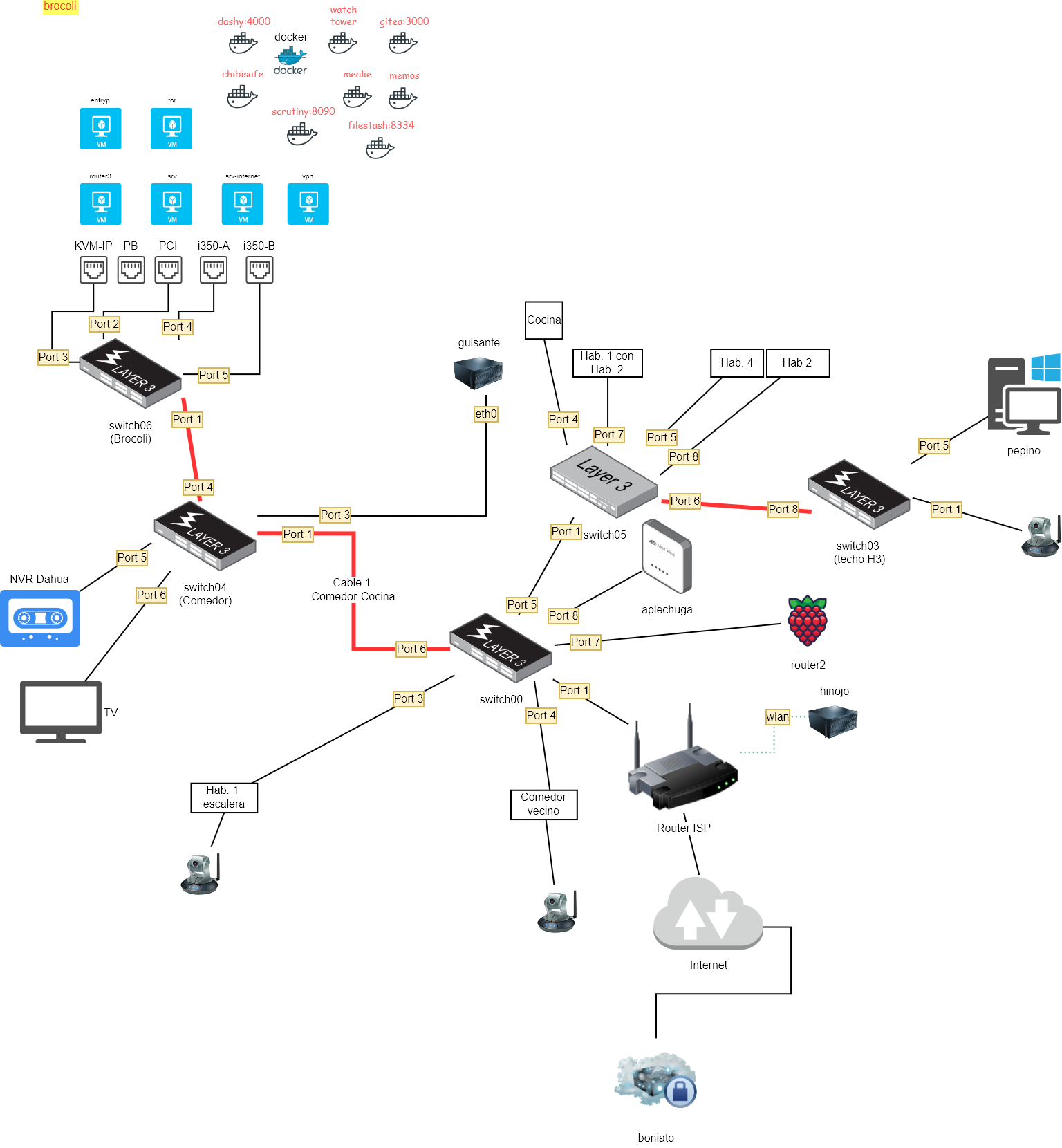
En este apartado encontramos las secciones con la configuración de la red Lechuga
Dispositivos de red
Routers
Puntos de acceso wifi
Switchs
Cableado piso
Acceso a cableado del piso: Clic aqui.
Dispositivos (MACS) activos en la red lechuga
Acceso a la lista: Click aquí
DNS dinámico
Configuración: Clic aquí
Servicios DNS y DHCP
Acceso a la configuración: Click aquí
Configuración VLAN
Configuración de las VLAN: Clic aquí.
Red invitados / IOT / etc.
Red no confiable para IOT: Clic aquí.
Red no confiable para Invitados: TODO
Redireccionamiento de puertos ( NAT )
Port Forwarding
Sólo para servicios exteriores a la LAN
Ver puertos redireccionados: Clic aquí.
Máquinas LXC/LXD
Se conectan a internet mediante un bridge en el host.
Todas las máquinas reciben una ip fija, determinada en el propio container.
Para ver las asignación fijas: Clic aquí.
Volcado de historial de IP
palabras clave: ip dinamica, ddns
Este proceso se ejcuta en el host brocoli
Se vuelca periodicamente las nuevas IP dinámicas que el ISP esté asignando al router, mediante el script /usr/local/bin/notifica-ddns/notifica-ddns.sh
Se llama desde /etc/crontab
se accede a través del http://www.lechuga.eu/brocoli_ip_publica
Estructura de red
Dibujo original en draw.io
https://mermaid.js.org/syntax/architecture.html
graph TD
%% Estilos Generales
classDef switch fill:#444,stroke:#333,stroke-width:2px,color:#fff;
classDef router fill:#2b5797,stroke:#1e3a8a,color:#fff;
classDef server fill:#1e7e34,stroke:#115e59,color:#fff;
classDef vm fill:#00aba9,stroke:#008a00,color:#fff;
classDef docker fill:#e3a21a,stroke:#b91d47,color:#fff;
classDef device fill:#f0f3f4,stroke:#7f8c8d,color:#333;
%% NÚCLEO CENTRAL (Internet y Router)
Internet((Internet)) --- RouterISP["Router ISP"]:::router
RouterISP --- |"Port 1"| switch00[switch00 Central]:::switch
RouterISP -. wlan .- hinojo[hinojo]:::device
Internet --- boniato["boniato VPN/External"]:::device
graph TD
%% Estilos Generales
classDef switch fill:#444,stroke:#333,stroke-width:2px,color:#fff;
classDef router fill:#2b5797,stroke:#1e3a8a,color:#fff;
classDef server fill:#1e7e34,stroke:#115e59,color:#fff;
classDef vm fill:#00aba9,stroke:#008a00,color:#fff;
classDef docker fill:#e3a21a,stroke:#b91d47,color:#fff;
classDef device fill:#f0f3f4,stroke:#7f8c8d,color:#333;
%% SWITCH 00 (Distribución Central)
switch00 --- |"Port 4"| ComedorVecino["Comedor vecino / Cámara"]:::device
switch00 --- |"Port 3"| Hab1Escalera["Hab. 1 escalera / Cámara"]:::device
switch00 --- |"Port 7"| router2(("router2 Raspberry Pi")):::router
switch00 --- |"Port 8"| aplechuga[aplechuga]:::device
%% Conexión Crítica Switch00 -> Switch05
switch00 === |"Port 5 / Port 1"| switch05[switch05]:::switch
%% Conexión Crítica Switch00 -> Switch04 (Cable 1 Comedor-Cocina)
switch00 === |"Port 6 / Port 1 (Cable 1)"| switch04[switch04 Comedor]:::switch
%% SWITCH 05
switch05 --- |"Port 4"| Cocina[Cocina]:::device
switch05 --- |"Port 7"| Hab1Hab2["Hab. 1 con Hab. 2"]:::device
switch05 --- |"Port 5"| Hab4["Hab. 4"]:::device
switch05 --- |"Port 8"| Hab2["Hab. 2"]:::device
%% Conexión Crítica Switch05 -> Switch03
switch05 === |"Port 6 / Port 8"| switch03[switch03 techo H3]:::switch
%% SWITCH 03
switch03 --- |"Port 5"| pepino["pepino PC Windows"]:::device
switch03 --- |"Port 1"| CamaraH3["Cámara"]:::device
switch04 (comedor)
graph TD
%% Estilos Generales
classDef switch fill:#444,stroke:#333,stroke-width:2px,color:#fff;
classDef router fill:#2b5797,stroke:#1e3a8a,color:#fff;
classDef server fill:#1e7e34,stroke:#115e59,color:#fff;
classDef vm fill:#00aba9,stroke:#008a00,color:#fff;
classDef docker fill:#e3a21a,stroke:#b91d47,color:#fff;
classDef device fill:#f0f3f4,stroke:#7f8c8d,color:#333;
%% SWITCH 04 (Comedor)
switch04 --- |"Port 5"| NVR["NVR Dahua"]:::device
switch04 --- |"Port 6"| TV["TV Comedor"]:::device
switch04 --- |"Port 3"| guisante[guisante]:::device
switch04 trunk1@=== |"Port 1"| switch00[switch00 comedor]:::device
trunk1@{ animate: true }
switch04 trunk2@=== |"Port 4"| switch06[switch06 Brocoli]:::switch
trunk2@{ animate: true }
Servidor brocoli
graph TD
%%{init: {'theme': 'redux'}}%%
%% Estilos Generales
classDef switch fill:#444,stroke:#333,stroke-width:2px,color:#fff;
classDef router fill:#2b5797,stroke:#1e3a8a,color:#fff;
classDef server fill:#1e7e34,stroke:#115e59,color:#fff;
classDef vm fill:#00aba9,stroke:#008a00,color:#fff;
classDef docker fill:#e3a21a,stroke:#b91d47,color:#fff;
classDef device fill:#f0f3f4,stroke:#7f8c8d,color:#333;
%% 0. EL SWITCH ANTERIOR
switch04:::switch
%% 1. EL SWITCH EXTERIOR
switch06:::switch
%% Conexiones Switch 06
switch04 trunk@=== |"Port 1"| switch06
trunk@{ animate: true }
switch06 --- |"Port 3"| KVMIP_ethernet:::device
switch06 --- |"Port 2"| ethernet_PCI:::device
switch06 --- |"Port 4"| i350A:::device
switch06 --- |"Port 5"| i350B:::device
%% 3. EL SERVIDOR LÓGICO (Solo contiene lo virtual)
subgraph brocoli ["Servidor Brocoli"]
KVMIP_ethernet["ETH KVM-IP"]
KVMIP_ethernet --- VGA_USB_brocoli["HDMI + USB"]
ethernet_PB["Ethernet Placa base"]
ethernet_PCI["Ethernet en PCI"]:::device
ethernet_PCI --- br0
%% Bridge principal a incus
br0["Bridge br0"]:::device
br0 --- eth0-incus
eth0-incus["eth0 para Incus"]:::device
eth0-incus --- entryp
eth0-incus --- tor
eth0-incus --- router3
eth0-incus --- srv
eth0-incus --- srv-internet
eth0-incus --- vpn
eth0-incus --- docker-brocoli
subgraph i350A["i350 port A"]
i350Avf2["vf2"]:::device
i350Avf3["vf3"]:::device
end
subgraph i350B["i350 port B"]
i350Bvf0["vf ..."]:::device
end
i350Avf2 --- vlan99-brocoli-01
i350Avf3 --- vlan99-brocoli-02
subgraph incus-brocoli ["Incus"]
subgraph docker-brocoli ["Contenedores Docker"]
dashy["dashy (4000)"]:::docker
watchtower["watchtower"]:::docker
gitea["gitea (3000)"]:::docker
chibisafe["chibisafe (8786)"]:::docker
mealie["mealie (8000)"]:::docker
memos["memos (5230)"]:::docker
scrutiny["scrutiny (8090)"]:::docker
filestash["filestash (8334)"]:::docker
end
entryp["entryp"]:::vm
tor["tor"]:::vm
router3["router3"]:::vm
srv["srv"]:::vm
srv-internet["srv-internet"]:::vm
vpn["vpn"]:::vm
vlan99-brocoli-01:::vm
vlan99-brocoli-02:::vm
end
end